
When your kids grow up, the question of which current AA or AAA games they want becomes inevitable. What can you do if you're not willing to shell out a lot of money for a high‑end gaming PC?
One solution could be to run the games remotely in the cloud and only stream it to you kid's devices. This saves lots of local computing power and your children can use older already existent hardware to test if gaming is fun for them.
GeForce NOW
GeForce NOW is a cloud service provided by NVIDIA. As a customer you rent gaming hardware in the NVIDIA cloud.
To get the games onto this hardware link your accounts (i.e. Steam or Epic games) with the NVIDIA account and are ready to play.
Only the smallest GeForce NOW package is for free, all other packages have a monthly fee. Please see the conditions on the NVIDIA page.
There are no special hardware requirements for GeForce NOW. NVIDIA claims even Android TV boxes have enough power for the latest games.
The onliest requirement is a stable internet connection which is starting from 25 Mbps at Full HD monitor resolution.
Old Hardware
Maybe you already have older hardware your children can use or you want to buy some refurbished hardware.
We bought an older Dell Notebook with an Intel i5-7440HQ cpu and 8GB of RAM. As this kind of hardware is no more capable of running Microsoft Windows 11 it is quite effortable.
As Microsoft Windows is no option for the operating system we chose Linux Mint.

It is based on Ubuntu, the Cinnamon desktop is nice and everything is working out of the box without any hassle.
Linux Mint + GeForce NOW
Linux Mint comes with Mozilla Firefox as the default browser installed. This shouldn't be a problem but GeForce NOW does not support Firefox completely. In our case when we started a game we had no mouse control in the game.
So we installed the Google Chrome browser using the official Chrome Download page https://www.google.com/chrome/?platform=linux.
Choose the DEB version.
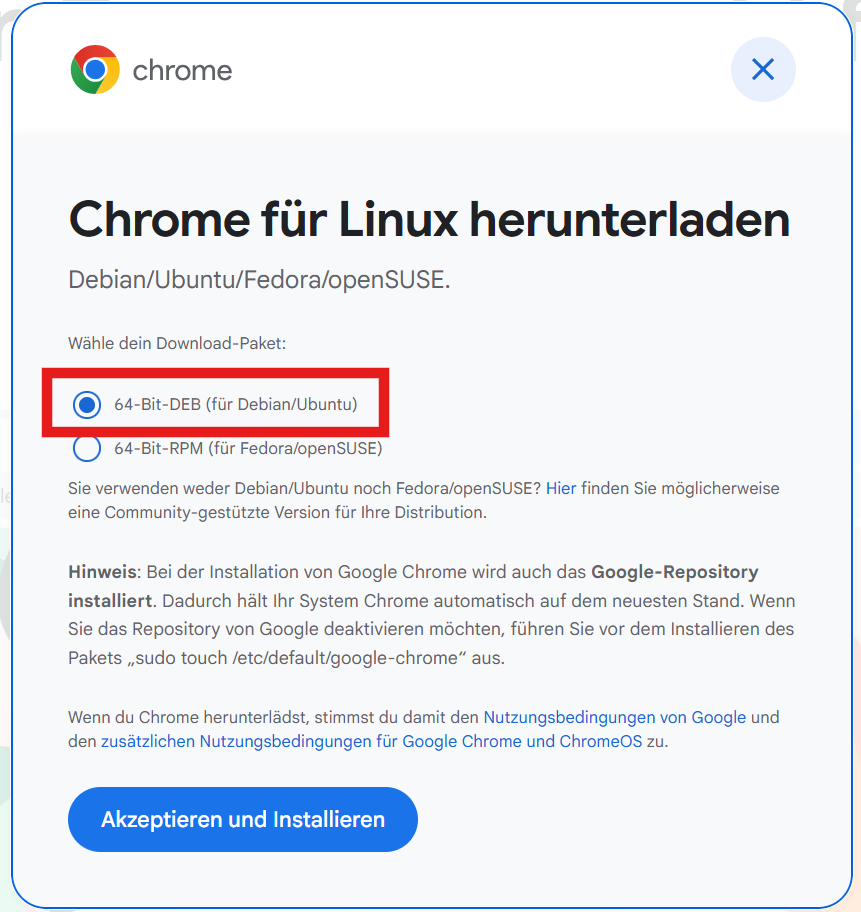
With Google Chrome mouse control in the game was available.
But now the CPU fan was blowing a lot and there was unexpected CPU load. How could this be? NVIDIA promised not to use a lot of CPU power?
It turned out the hardware video acceleration is turned off in Google Chrome running in Linux - in Firefox it is switched on by default.
In the internet there are several explanations how to turn on the hardware video acceleration in Google Chrome in Linux machines.
For us it only worked to enable Vulkan starting Google Chrome with this options:
--use-gl=angle
--use-angle=vulkan
--enable-features=VaapiVideoDecoder,VaapiIgnoreDriverChecks,Vulkan,DefaultANGLEVulkan,VulkanFromANGLE
--ozone-platform-hint=auto
A quick and dirty solution to apply these options was to append the options to the start command in the UI:
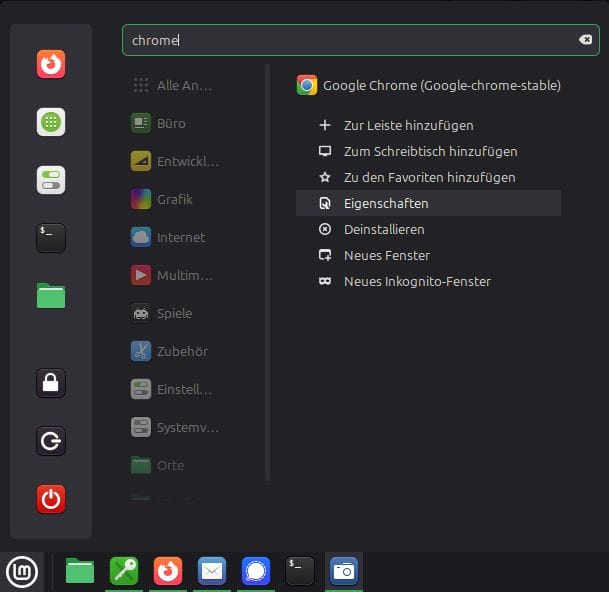
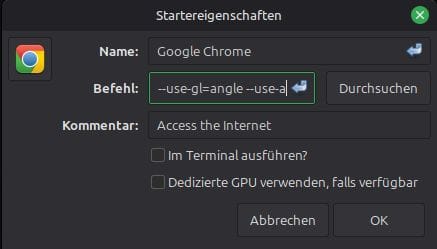
The result was less CPU load and less CPU fan noise.
Summary
We chose the Performance package in GeForce NOW which is about € 131,88 per year. The Dell Laptop was about € 139,–. This is together about € 271,– for the first year, the next years are only the GeForce NOW license.
Buying a powerful gaming computer, at least now where RAM, SSD and graphic cards prices explode, is at least € 1500,--. As this gaming pc maybe lasts about 4 years until it needs to be upgraded or replaced the yearly costs are about € 375,--.
For us playing in GeForce NOW is as good as playing on a dedicated local gaming PC. Maybe this changes in the future but then we can still buy a gaming PC.
